

AI Partner Tool to Create Trainings
CourseClip Studio
Build Accessible, Rubric-Aligned Learning Faster
CourseClip Studio is a web-based instructional design tool that helps educators, trainers, and content creators turn existing materials into clear, accessible, and assessment-ready learning experiences—without starting from scratch.
Instead of juggling multiple tools for content curation, learning objectives, rubrics, and accessibility checks, CourseClip Studio brings everything into one structured workflow.
CourseClip Studio helps you:
Convert readings, notes, PDFs, and pasted content into structured learning projects
Generate and refine measurable learning objectives in plain language
Build 3×3 micro-rubrics (Beginning, Developing, Mastered) tied directly to objectives
Write step-by-step instructions aligned to each rubric
Review projects for clarity, WCAG accessibility, and UDL considerations
Export a clean, accessible DOCX ready for LMS upload, sharing, or review
AI accelerates drafting, but you stay in control of instructional decisions.
Designed for Accessibility and Clarity
CourseClip Studio is built with accessibility and Universal Design for Learning in mind from the start.
The platform supports:
WCAG-aligned document structure (headings, tables, readable formatting)
Reading-level and jargon checks
Clear alignment between objectives, rubrics, and instructions
Transparent expectations for learners and reviewers
Nothing is hidden behind “auto-fixes.” The tool works with you, showing what could be improved, where it appears, and how to revise it.
Who CourseClip Studio Is For
CourseClip Studio is used by:
Faculty and instructors building assignments or lesson materials
Instructional designers supporting accessible course development
Professional trainers and HR teams documenting learning expectations
Content creators developing structured, self-paced learning
If you care about clarity, accessibility, and defensible assessment, this tool is built for you.
Try it out on our basic version!
You can explore CourseClip Studio right now using the free version:
Try the free app:
https://course-clip-studio-free.base44.app
The free version lets you experience the core workflow and see how projects are built before committing further.
Become a Beta Tester (Includes Training Course)
If you want full access and guidance on how to use CourseClip Studio effectively, you can join the beta program.
Beta testers receive:
Full access to CourseClip Studio
A step-by-step course on how to use the app
Ongoing updates as the tool evolves
Join the beta and course here:
https://techinclusionpro.onlinecoursehost.com/courses/courseclip-studio-app-
Why CourseClip Studio Exists
Most educators and trainers are expected to produce accessible, well-aligned materials—but are rarely given tools that support that work end-to-end.
CourseClip Studio exists to close that gap.
It doesn’t replace your expertise.
It makes your work clearer, faster, and easier to maintain.
Disclaimer:
This tool is provided for informational and educational purposes only. It is not intended to store or process confidential student, employee, or medical data. Always follow your organization’s data-protection and accessibility policies when using this application.
Below is a YouTube video Overview of how CourseClip Studio works.

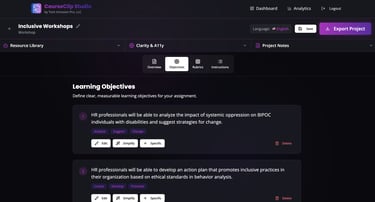
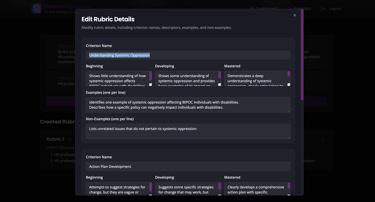
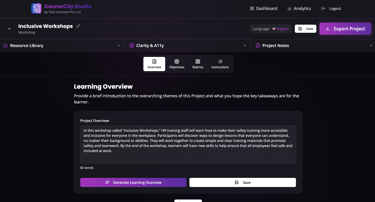
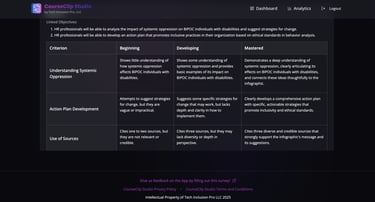
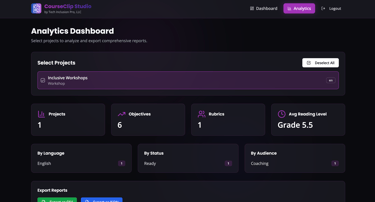


Below is an image gallery of different parts of the application.
Tech Inclusion Pro LLC
COntact us:
techinclusionpro@gmail.com
© 2024. All rights reserved.